
Table of Contents
- Step 1: Gather Your Insurance Information Before You Check
- Step 2: How to Check Insurance Provider Directory
- Step 3: Verify Insurance Network Status for Durable Medical Equipment
- Step 4: Understanding TRICARE Breast Pump Coverage and Network Rules
- Step 5: Navigate the Insurance Authorization Process
- Step 6: What to Do When Your Provider Is Out-of-Network
- Common Mistakes to Avoid When Verifying Network Status
- Conclusion
- Frequently Asked Questions
Last Updated: September 28, 2026
Step 1: Gather Your Insurance Information Before You Check
To verify insurance network status, start with the right documents in hand.

- Your insurance card, front and back
- The member ID and group number
- The name of the plan holder
- Your date of birth and the policyholder’s
- The exact product or service name your doctor ordered
- Your provider’s name and tax ID number, if you have it
Photograph both sides of your insurance card and save the images to your phone. You will need those numbers at least three times during this process, and digging out the card each time wastes hours.
Step 2: How to Check Insurance Provider Directory
The fastest way to verify insurance network status is to use your insurer’s online provider directory, then confirm by phone.
Using Your Insurer’s Online Directory
Log in to your member portal and search for the supplier by name and location, filtering by specialty to narrow results to medical equipment suppliers.
Watch for these labels:
- In-network: the plan has a contract with the provider
- Out-of-network: no contract, so you may pay more
- Directory listing may be outdated: a common disclaimer on these pages
Calling Member Services to Confirm
Call the number on the back of your card and ask: “Is this supplier in-network for my specific plan?” Then request the reference number, the representative’s name, and written confirmation by email or portal, that reference number is your proof if a claim goes sideways.
Never trust a directory listing alone for expensive equipment. A supplier that shows as in-network today can bill as out-of-network next month if its contract lapses. Always get phone confirmation with a reference number.
Step 3: Verify Insurance Network Status for Durable Medical Equipment
Durable medical equipment, or DME, follows different network rules than a doctor’s visit, this is where most coverage surprises happen. DME includes items your doctor prescribes for home use, such as breast pumps, back support braces, and abdominal binders, and usually falls under your plan’s DME benefit.
Why DME Suppliers Have Separate Network Rules
A hospital can be in-network while the supplier that ships your breast pump is not, the contracts are separate. Your plan may also use a single national supplier or a small approved group for DME, and ordering outside that group can be treated as out-of-network even if the product is covered.
Ask member services two questions:
- Does my plan cover this item under the DME benefit?
- Which suppliers can I use for it?
Step 4: Understanding TRICARE Breast Pump Coverage and Network Rules
TRICARE breast pump coverage is one of the most generous maternity benefits available and works differently from most private plans. TRICARE covers pumps for expecting and new mothers without a referral for the pump itself, but the rules are specific if you want it before your baby arrives.
What TRICARE Covers
TRICARE covers breast pumps as durable medical equipment (DME) for mothers who are expecting or currently breastfeeding. Coverage generally includes:
- A manual or standard electric pump, or a hospital-grade rental in certain situations
- A hands-free pump for mothers who need to pump while working or caring for the baby
- Replacement parts and supplies within set limits
Hands-Free Pumps: What TRICARE Families Should Know
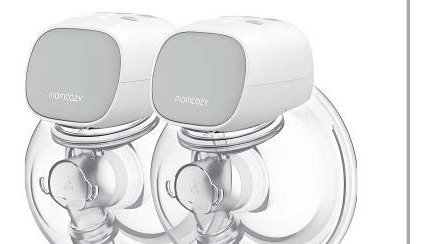
A hands-free breast pump is a wearable or strap-supported pump that lets you pump without holding the collection cups in place. For TRICARE families, this matters because the benefit supports mothers returning to work or caring for other children.
- The type of pump (hands-free or wearable)
- The quantity
- The diagnosis code that supports the medical need
- The length of need, if your provider specifies one
Eligibility Windows and Quantity Limits
TRICARE sets windows for when you can order a pump and how often you can replace it. These figures change, so check the official TRICARE breast pump coverage page for the current numbers before you order. As a general pattern, you can order a pump during pregnancy within a defined window, and replacement pumps are limited to a set interval.
Which TRICARE Program Applies to You
TRICARE splits coverage between programs. Most active duty families use TRICARE Prime or TRICARE Select, and rules differ, so confirm which applies. Ask member services: “Which TRICARE program covers my breast pump, and which suppliers can I use?” Get both answers in writing.
How the Authorization and Shipping Work
This is where General Home Medical Supply does the heavy lifting. We handle the insurance authorization process from start to finish, contacting your insurer, submitting the paperwork, and confirming your approval, then ship your breast pump and maternity back support to your home at no charge, with free shipping.
For TRICARE families, the supplier matters as much as the benefit. A supplier that knows TRICARE’s rules gets you approved faster and avoids the back-and-forth that delays delivery. We handle the authorization and ship your breast pump and maternity back support to your home at no charge, with free shipping.
Step 5: Navigate the Insurance Authorization Process
Authorization is where good documentation wins. The insurance authorization process is how your plan agrees, in advance, to pay for a specific item.
Check Your Insurance Coverage →
Prior Authorization vs. Verification: What’s the Difference?
Verification confirms you have coverage and that a supplier is in-network, but does not promise payment. Prior authorization is a formal approval from your plan before the item ships, and it does promise payment if the item matches what was approved. A supplier can verify your benefits and still have a claim denied later without prior authorization.
- A signed prescription with the item and quantity
- Clinical documentation showing why you need it
- Your member ID and plan details
- Any required documentation of medical necessity from your provider
Step 6: What to Do When Your Provider Is Out-of-Network
An out-of-network supplier is not always a dead end. Try these steps in order:
- Ask about a single-case agreement. Your plan can approve one supplier for one item, even outside the network.
- Request a network adequacy exception. If no in-network supplier can provide the item, some plans must allow an out-of-network one.
- Switch to an in-network supplier. This is usually the fastest fix.
- File an appeal if a claim is denied. You have the right to an internal appeal, and often an external review after that.
Read the Denial Before You React
When a claim is denied, the letter is a roadmap. Every denial notice must state the reason, the plan provision it relied on, and your appeal rights. Highlight the denial code, the appeal deadline, and where the appeal must be filed.
- The item was billed outside the DME benefit
- No prior authorization was on file
- The prescription was missing the item, quantity, or diagnosis code
- The supplier was out-of-network for that specific plan
- The item was submitted before the eligibility window opened
Internal Appeal vs. External Review
These are two different stages, and confusing them costs time.
Gather Evidence Before You Write the Appeal
A strong appeal is a paper trail, not a complaint. Collect:
- The denial letter with the denial code
- Your prescription, including the item, quantity, and diagnosis code
- Chart notes or a letter from your provider explaining medical necessity
- Your summary of benefits, so you can quote the exact plan language that covers the item
- Any reference number from a prior call with member services
What to Put in an Appeal Letter
You do not need legal training to write a clear appeal. A short, structured letter beats a long emotional one. Include:
- Your name, member ID, and claim number
- A one-sentence statement of what you are appealing
- The date of the denial and the denial code
- The specific plan language that covers the item
- A short explanation of medical necessity, backed by your provider’s letter
- A list of attached documents
- A clear request: “Please overturn this denial and reprocess the claim.”
Ask your plan for the denial in writing with the denial code. That code tells you exactly why the claim failed, a coding error, a missing authorization, or a network issue. Fixing the right problem beats guessing.
When to Bring in a Patient Advocate
If you have filed one appeal and been denied, or the paperwork is piling up while you recover from delivery, a patient advocate can help. They handle insurance appeals, gather records, and talk to plans on your behalf. Ask your hospital’s patient services department first, many offer this help at no cost.
If the Appeal Is Denied
If your internal appeal is denied and external review does not overturn it, contact your state’s department of insurance. Every state has an insurance commissioner who handles consumer complaints about coverage decisions, and a complaint there often gets a faster response than another call to member services.
The appeal process rewards documentation, not volume. One clear letter with the right attachments beats five emotional emails. Note your deadline the day the denial arrives, and send everything with proof of delivery.
Common Mistakes to Avoid When Verifying Network Status
Most coverage problems trace back to a handful of avoidable errors:
| Mistake | What Happens | How to Avoid It |
|---|---|---|
| Trusting the online directory only | Claim processed as out-of-network | Call and get a reference number |
| Skipping prior authorization | Claim denied after delivery | Confirm authorization before shipping |
| Using a general medical supplier for DME | Item billed outside your DME benefit | Ask which suppliers your plan approves |
| Not checking the plan name on file | Mismatched records slow everything down | Confirm the current plan name with member services |
| Missing the filing deadline | You lose the right to appeal | Note the deadline on your calendar the day you get the denial |
Conclusion
Verifying your network status takes a few phone calls and some paperwork, but the payoff is real: no surprise bills and equipment that arrives when you need it.
Frequently Asked Questions
How do I check if a medical equipment supplier is in-network?
Start by logging into your insurer’s online provider directory and searching for durable medical equipment suppliers in your area. Call the supplier directly and ask them to verify your specific plan. Then call your insurance company’s member services line to confirm the supplier is in-network for your plan. Get the representative’s name and a reference number. If you use General Home Medical Supply, our team handles this verification for you and obtains all necessary authorizations from your insurance before shipping your equipment.
Does TRICARE cover hands-free breast pumps?
TRICARE covers breast pumps for new mothers, including hands-free models, when they are medically necessary and obtained through a TRICARE-authorized supplier. Coverage depends on your specific TRICARE plan and whether you have a prescription from your healthcare provider. To verify TRICARE breast pump coverage, contact your regional TRICARE contractor or work with a supplier that handles the insurance authorization process for you. General Home Medical Supply coordinates with TRICARE to get authorization and ships the pump directly to your home at no charge to you.
What is the difference between in-network and out-of-network coverage?
In-network providers have a contract with your insurance company agreeing to negotiated rates, so you typically pay less out of pocket. Out-of-network providers do not have that contract, which means you may pay more or your plan may not cover the service at all. For durable medical equipment like breast pumps and maternity back support, using an in-network supplier is the most reliable way to avoid unexpected bills. Always verify network status before ordering.
What should I do if I’m unsure about my insurance network status?
Call your insurance company’s member services number on the back of your card and ask them to confirm whether the supplier is in-network for your specific plan. Ask for a reference number and the representative’s name. You can also ask the supplier to run a benefits verification on your behalf. General Home Medical Supply handles this step for you, contacting your insurer directly to confirm coverage and obtain all required authorizations before anything ships.